

 Login
Login
Author: Graham Charlton

Topic: SEO

Time to read: 15 minutes
A Google Business Profile is one of the easiest ways to improve the appearance of your website in search results, yet many businesses fail to use it to its full potential.
In this guide, I’ll look at why businesses should make use of the service, how to get set up, and why it’s worth taking the time and effort to make the listing as useful and effective as possible.
What is a Google Business Profile?
A Google Business Profile is essentially a local business listings service, and it’s widely used. For example, you’ll sometimes find listings for multinationals like Starbucks alongside local cafes and restaurants.
Google Business Profile was previously known as Google My Business, and before that Google Places and Google Local.
While the big players will usually already have a Google Business Profile listing, every business has a chance of achieving a prominent listing if they get the basics right and deliver value to customers.
You’ll see these listings on many Google searches, and your business can appear in different ways. Most obvious is a search for your business name.
Here’s an example for a cafe in Newcastle, on a direct search for the brand name. The Google Business Profile appears at the top of the page.
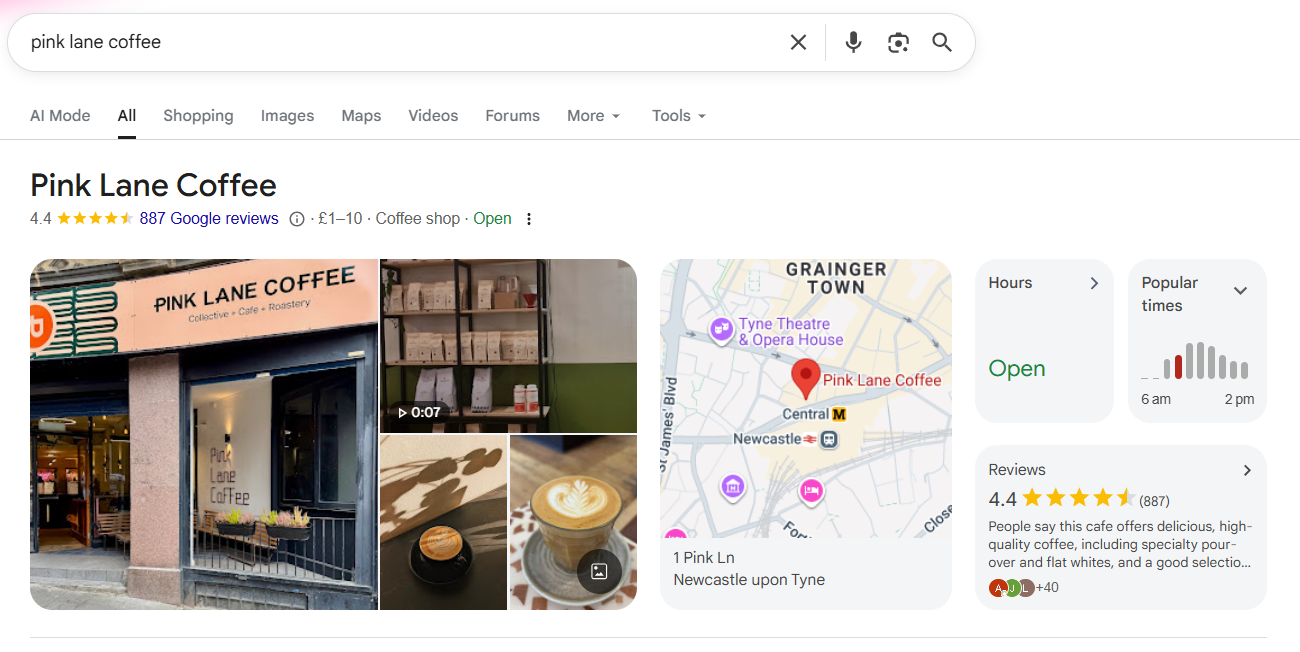
If someone has searched for the business name like this, it’s probable that they’re looking for information about the cafe, and these listings can provide very quick answers.
For example, they can see the address and opening hours straight away, as well as a summary of reviews. There are images, and a link to directions – handy if the searcher is a few minutes’ walk away looking for a coffee. The searcher finds the details they need quickly, with the only potential drawback being that they have found the information in the listing rather than the business’ website.
However, the benefits of the listing are likely to make up for any loss of web traffic. Besides, they’ll still click through for more detail on products (or menus in the case of cafes).
Another way a Google profile listing will appear in searches is for local searches on a business type.
This is perhaps what makes Google Business Profiles so powerful – these listings dominate the first page of search and the cafes listed in this case are likely to benefit from being in such a prominent position.
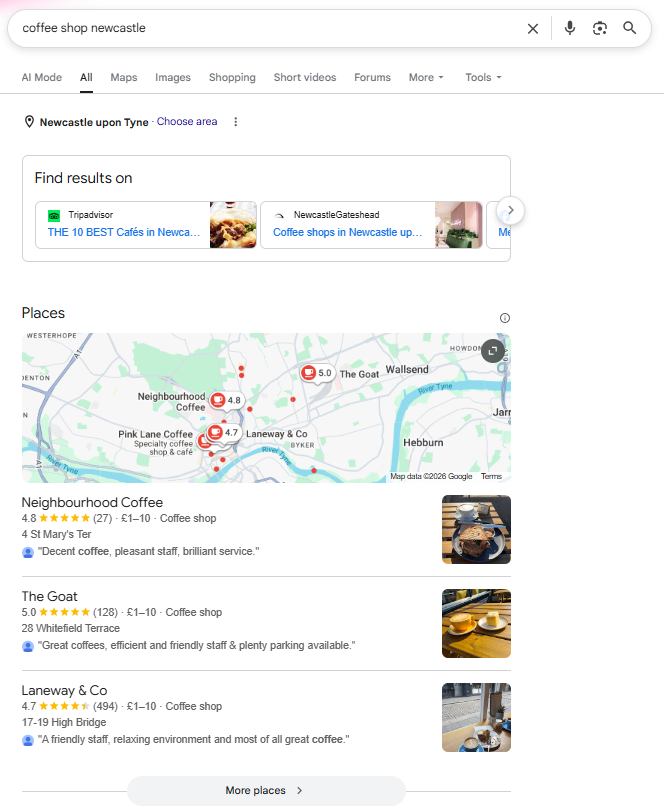
These Google Business Profile results are often referred to as the ‘three pack’, as Google picks out the three best or most relevant local listings for these searches.
Why you need a Google Business Profile for search
Prominence in search results
A listing can help your business to stand out in search results, and can help people to find you.
While your Google Business Profile will guarantee that you’ll appear in brand name searches, results for ‘business type’ results won’t guarantee rankings.
So, for example, if you have a coffee shop and people search for your business name, they’ll see your Business Profile. If they search for coffee shop in your area, there’s no guarantee your result will be shown.
A Google Business Profile will certainly enhance your chances of a prominent search result, but rankings depend on a range of factors but there are ways to maximise your chances.
If you can get into the top three results, it’s a great way to drive people to your website or physical location.
The importance of local search
Google Business Profile is all about local search – this can include searches made near your business, and searches made outside the area with the location added.
Stats suggest that 46% of Google searches carry local intent. And local search is often tied in with mobile. A survey from Uberall found that ‘near me’ searches – those with local intent, were used by 82% of smartphone shoppers.
The survey also found that 60% of mobile users were ‘very likely’ to click on the first two or three results they see, which is significant given how Google Business Profile results appear in mobile searches.
To use the coffee shop example again, the top result has even greater prominence on a mobile search.
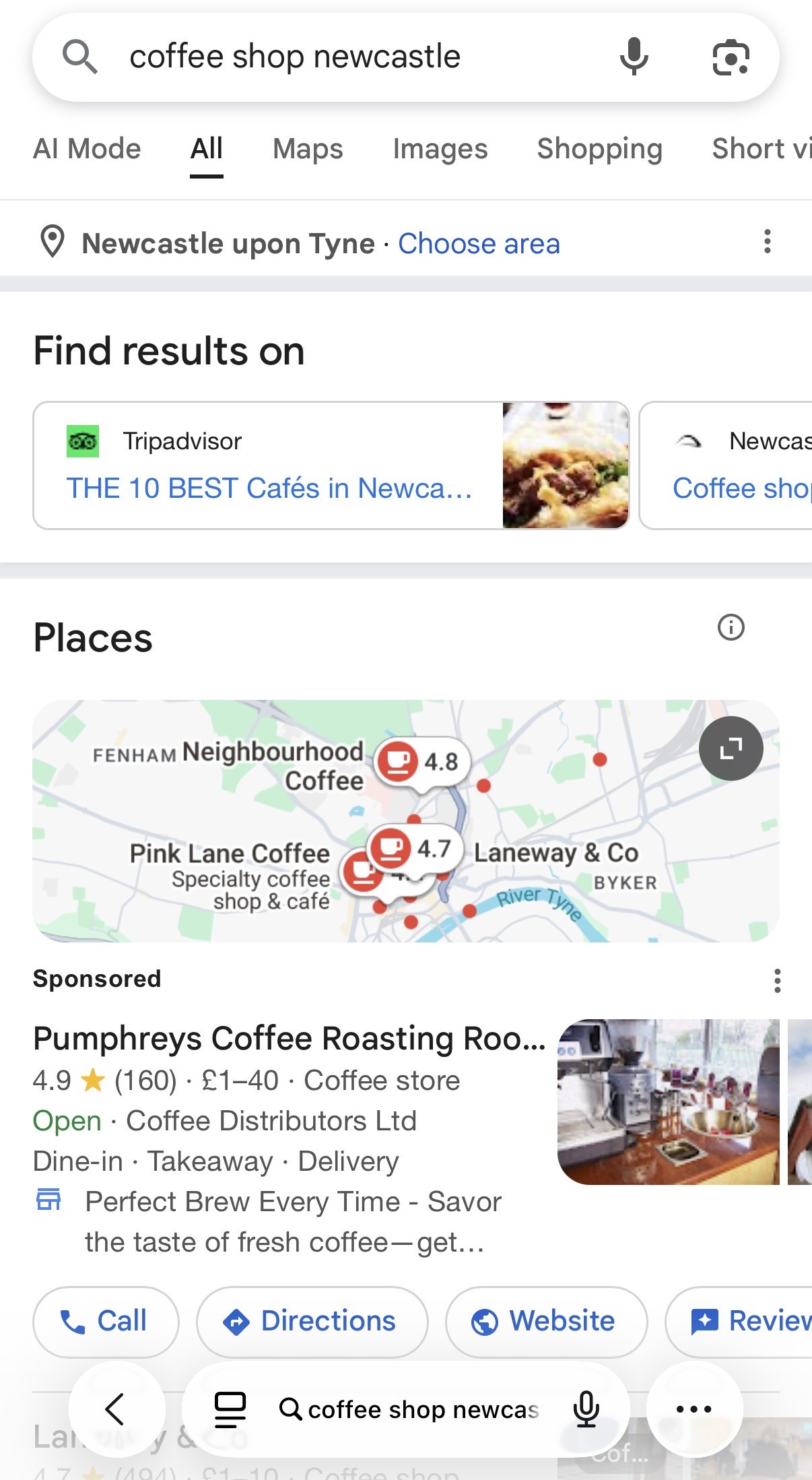
If you want to improve your chances in local search results, then a Google Business Profile listing is the key.
The importance of mobile search
As of 2025, 62% of website traffic comes from mobile devices. And a significant portion of mobile search activity is likely to be local.
This makes mobile visibility ever more important, and Google Business Profile is key to that, as these listings dominate mobile search results, to the extent that it’s impossible to avoid them on many local searches.
For some business types, cafes and shops being the most obvious, mobile search can be more powerful, as the location of the searcher and the query mean they have a real intent to purchase or make a visit.
It makes it easier for customers to find you
Listings provide key information quickly for searchers which can help them to find a business and decide on a visit.
Opening hours and popular times to visit are displayed at a glance, helping people quickly find the information they need, while links to maps help with directions. All of these factors make it more likely that searchers will visit your physical location.
Why else do you need a Google Business Profile?
It makes it easier for customers to find you
Listings provide key information quickly for searchers which can help them to find a business and decide on a visit.
Opening hours and popular times to visit are displayed at a glance, helping people quickly find the information they need, while links to maps help with directions. All of these factors make it more likely that searchers will visit your physical location.
Credibility
Web users are now well accustomed to seeing these profiles, and their presence can lend credibility to your business.
The listings look professional and provide key information that helps people to decide whether you’re a credible business or not through address information and reviews for instance.
It’s free and easy to set up a listing
A Google Business Profile listing has many potential benefits, and even a relatively basic listing can help to improve your search presence, so it’s worth setting one up.
Find insights into customer behaviour
Google provides some useful data around your listings which you can use to gain insights into customer behaviour.
For example, you can see how people found your listing (through web searches or maps), and information on the actions taken after viewing the listing.
You can see how well the Profiles perform in terms of sending visitors to your website, if they view menu images for cafes and restaurants, and how many bookings the Profile helps to drive.
This can help you to understand how customers find you, and help you to provide the kinds of information they’re looking for.
How to claim an existing or unverified Google Business Profile
It’s worth checking if your business already has a listing first. If a Google Business Profile listing for your business already exists but is unverified, you can claim and verify it by following these steps:
Search for your business on Google
- Go to Google Search or Google Maps and type in your business name
- If your business appears but is unverified, you’ll see an option like ‘Own this business?’ or ‘Claim this business’
Click ‘Own this business?’ or ‘Claim this business’
- Click the prompt to start the claim process
- Sign in to your Google account – this should be the one you want to manage the business with
Verify that you own the business
- Google will ask you to verify your ownership before allowing access
- Possible verification methods include:
- Postcard: Google sends a postcard with a code to your business address
- Phone or email: If available, Google will send a code via call, text, or email
- Instant verification: Possible if your business is already verified in Google Search Console
- Video verification: Google may request a live or recorded video of your business location
Wait for verification
- If using a postcard, it typically arrives within 5-14 days
- Enter the verification code in Google Business Profile Manager
Complete and optimise your profile
- Once verified, update business details, such as:
- Address, phone number, and website
- Business hours and services
- Photos and business description
What if someone else manages the profile?
- If another person has already claimed the listing, you’ll need to request ownership access. To do this:
- Go to Google Business Profile Manager
- Search for and select your business
- Click ‘Request access’ and fill in the required details
- The current owner has three days to respond. If they decline or don’t respond, you may have the chance to claim it directly
Setting up a new Google Business Profile listing
To add a Google Business Profile listing, follow these steps:
Sign in or create a Google account
- Go to Google Business Profile
- Sign in with your Google account. If you don’t have one, create a new Google account
Add your business details
- Click “Start Now” and enter your business name
- If your business name isn’t listed, click “Add your business to Google”
- Choose the correct business type and category that best describes what you do
Add your location (if applicable)
- If you have a physical location (e.g., a shop, restaurant, or office), select “Yes” and enter your address
- If you don’t have a physical store but serve customers in a specific area, select “No”, then enter your service areas
Add contact details
- Provide your phone number and website URL (optional but recommended)
Verify your business
- Google requires verification to confirm that you own or manage the business. Verification methods include:
- Postcard: Google mails a postcard with a verification code
- Phone: Available for some businesses via a call or text
- Email: Some businesses can verify via email
- Instant verification: Available if you’ve already verified your business with Google Search Console
- Video verification: Google may ask for a video call or recording to confirm your location
Optimise your profile
- Add business hours, including special hours for holidays
- Upload photos and videos to make your profile more appealing
- Write a business description that highlights your products or services
- Enable messaging (if you want to allow customers to contact you via Google)
- Set up booking options (if applicable)
Keep your profile updated
- Regularly post updates, offers, and events
- Respond to customer reviews and questions
- Monitor insights to track how customers interact with your profile
Once your business is verified, it will start appearing on Google Search and Google Maps, helping more people find and connect with you.
Once set up, you can access and view your dashboard via the Google Business Profile homepage.
How to optimise your Google Business Profile
Once you have your profile set up, there’s plenty you can do to make it stand out in search results, and to provide useful information and features for your target customers.
Get the basics right
Make sure you have the NAP (business name, address and phone number) information correct and keep it up to date.
It’s also important to choose the right category, as this affects the searches your business may appear in. It can be a temptation to go broad to attract more searches, but you are likely to have a better chance of ranking for more specific terms – ‘nail salon’ rather than ‘salon’ for example.
Add the information that customers find useful
Think about what you would want to see on a listing. For example, many businesses don’t add opening hours, but this can be crucial if customers are deciding whether or not to pay you a visit.
Make sure you describe the business, as it can help to attract visits, while adding relevant links to any menus or similar makes it easy for customers to decide on a visit or order based on the listing.
Monitor and update regularly
Business Profile listings don’t have to take too much work, but it is important to keep information and links up to date. For example, adjust opening hours for the Christmas period if you need to.
Also, make sure the photos match what customers will find. If you’ve just refreshed the store and it looks great, or added some new items to your menu, make sure the photos reflect that.
Appointment bookings
The ability to add bookings can be very useful for some business types, restaurants being one obvious example. Businesses can also add details and links to forthcoming events. Posts can also show text, video or photo content.
Build citations
Citations will help you to improve the ranking for your listing, as long as they are relevant and accurate.
You may already have some on sites like Yelp and Foursquare, as well as local listing sites. These help Google to decide whether your business is relevant to local queries.
The key is to ensure that any listings with NAP details are correct, and to add your details to any listings sites that are relevant to your business. Relevance is key here – for example, if you run a restaurant, there may be local guides listing places to eat.
Reviews
Reviews are a ranking factor in Profile listing, and a good average review score will help you to increase your chances of featuring in the all-important ‘three pack’ – the first three listings shown on searches.
These reviews also increase the chance that people will investigate your listing further, clicking on links and maybe visiting your business.
Encouraging your customers to leave positive reviews can help here, as well as making it easy for customers to review you.
However, it’s more about doing the kinds of things that motivate customers to leave positive reviews. This includes giving value to customers through your products, and providing great all-round service.
Complete every section
How complete your Google Business Profile is can help rank you higher in local search results, but it also increases the number of potential actions customers take when they find your profile.
There’s a lot of information to provide, so some should be prioritised over others. .
Your name, address, phone number, website address and opening hours should be a priority. The category and attributes, products and services and ‘from the business’ sections will take a bit more time and thought whereas posts and reviews should be ongoing.
Summary
A Google Business Profile listing is a must for businesses of any size. It’s free, and it’s one of the easiest and fastest ways to increase your visibility on search results.
Mobile search with local intent is becoming increasingly popular, and a Business Profile listing appears front and centre for mobile searches.
To make the most of your profile, it’s important to go beyond the basics and work to create a useful and eye-catching listing which will encourage searchers to visit your stores, your website, or get in touch with you.